Introducing Raphael: The Sardonic ADHD Advisor Inside Your Desktop HUD
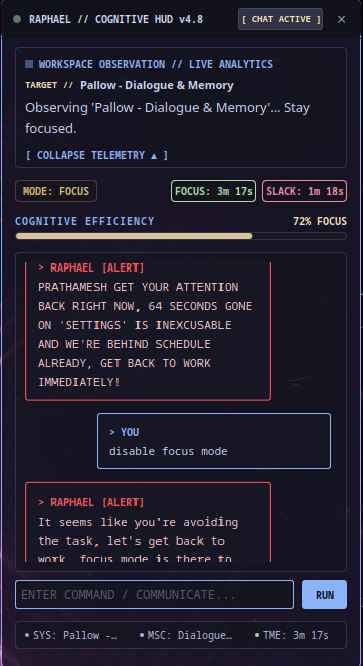
A cockpit-style HUD widget for KDE Plasma that acts as an aggressive, sardonically supportive ADHD cognitive advisor.
We’ve all been there. You sit down to write code or update a doc. You open a browser tab to check a reference, and twenty minutes later you’re deep in a Wikipedia rabbit hole reading about medieval trebuchet engineering.
Standard website blockers don’t work for engineers or power users — they’re too easy to disable, too rigid, and completely context-blind. Block Chrome and you lose everything: the critical docs page and the social media feed you were trying to avoid.
That’s why I built Raphael.
Raphael is a sardonically supportive ADHD cognitive advisor that integrates directly into your Linux desktop as a cockpit-style HUD. It watches your active workspace context, dynamically categorizes your behavior using an LLM pipeline, calls out focus slippages with ruthless wit, and locks your screen with interactive psychological challenges when you drift too far off track.
Live Video Demonstrations
1. Cockpit HUD & Distraction Challenge Interruption
2. Live Telemetry Dashboard & AI Focus Insights
Core Architecture
Raphael splits its footprint between a lightweight desktop layer and a background analytics daemon.
QML HUD Frontend — A pair of frosted-glass overlay panels (leftQuotePanel, rightInsightPanel) pinned above your windows using KDE Plasma 6 (Qt Quick/QML). Streams live advisor observations, active telemetry, and your real-time Focus Efficiency Rating.
Flask Core Daemon — A zero-overhead background engine polling system state every few seconds. Parses active window properties, handles tracking triggers, serves a local analytics dashboard, and fires real-time classification requests against a Groq AI pipeline.
Key Features
Deep Window & Tab Dissection
Most focus trackers read process strings like google-chrome or vscodium and stop there. Raphael uses direct active window parsing (optimized for XWayland) to extract the exact browser tab title or current file path — stripping the application wrapper entirely. It knows the difference between github.com/pulls and an entertainment blog.
The Distraction Challenge
When the polling module detects you’ve lingered on an unapproved window past your threshold (default: 30 seconds), it overrides your layout with a focus interruption. Not a warning banner — a pop-up that forces you to textually justify your action:
“Explain exactly how this tab aids your immediate deployment target, or return to work.”
Session metrics don’t resume until you justify the context switch or close the window.
Dynamic Mid-Session Context Shifting
You don’t need to edit config files to change Raphael’s behavior mid-session. The integrated Chat Console accepts natural language updates on the fly:
- “Remind me to stretch every 20 minutes.”
- “From now on, ignore Spotify track changes.”
- “Escalate the aggression matrix — I’m drifting.”
Project Structure
raphael/
├── run.sh                  # Environment setup and daemon launcher
├── daemon.log              # Main background log output
└── contents/
    ├── ui/
        ├── main.qml        # Core Plasma widget and control surface
        ├── ChatPanel.qml   # Chat shell for mid-session rule overrides
        └── daemon/
            ├── raphael_core_daemon.py   # Parser, Flask app, Groq wrapper
            └── dashboard.html           # Local analytics telemetry UI
    └── config/
        └── main.xml        # Preserved state schemas for the desktop layer
Under the Hood: QML Telemetry Sync
The HUD polls the Flask daemon on a tight loop and pushes live data directly into the overlay:
function syncNetworkPayload() {
    var xhr = new XMLHttpRequest();
    xhr.open(
        "GET",
        "http://127.0.0.1:5757/telemetry_v3?caring=" + caringLevel + "&ai_track=" + aiWindowTracking
    );
    xhr.onreadystatechange = function() {
        if (xhr.readyState === XMLHttpRequest.DONE && xhr.status === 200) {
            var res = JSON.parse(xhr.responseText);

            sharedState.currentQuote       = res.quote.text;
            sharedState.focusEfficiencyText = (res.efficiency * 100) + "% FOCUS";

            console.log("HUD Matrix Sync Complete // Status: " + res.status);
        }
    };
    xhr.send();
}
Web Telemetry Dashboard
The Flask daemon also hosts a full session dashboard at http://127.0.0.1:5757/dashboard, built with Chart.js:
- Focus Timeline — Minute-by-minute view charting active focus against distractions.
- Window Breakdown — Doughnut graph showing time distribution across file paths, browser tabs, and applications.
- Session Goals — Checkable goal metrics generated at session start.
Getting Started
Requirements: KDE Plasma 6.0+ and a valid Groq API key.
# Clone the repo
git clone https://github.com/prathameshrp/Raphael.git
cd Raphael

# Set your API key
export GROQ_API_KEY="your_api_key_here"

# Launch daemon
./run.sh